Chapter 6 Introduce a buy_down_interval to make a single trader more profitable
In the previous chapter, we built a robust supervision tree that can trade multiple symbols in parallel and recover from crashes. That’s great for reliability - but our trading strategy still has a subtle profitability problem.
When a trader finishes a sell and the Leader starts a new one, it immediately places a buy order at the current market price. That’s the same price we just sold at! We’re paying exchange fees twice (once for the sell, once for the buy) without any price movement in our favor. It’s like running on a treadmill - lots of activity, but we’re not actually getting anywhere.
In this chapter, we’ll fix this by introducing a buy_down_interval. Instead of buying at the current price,
our traders will calculate a lower price and place their buy orders there. This simple change ensures we only re-enter a position
when the price has dipped enough to cover our fees and leave room for profit. It’s a small tweak with a meaningful impact on the bottom line.
Let’s dive in!
6.1 Objectives
- present reasons why to introduce
buy_down_interval - add
buy_down_intervaltoNaive.Trader’s state and calculate buy price - add
buy_down_intervaltoNaive.Trader’s state compiled by theNaive.Leader - manually test the implementation inside IEx
6.2 Why do we need to buy below the current price? Feature overview
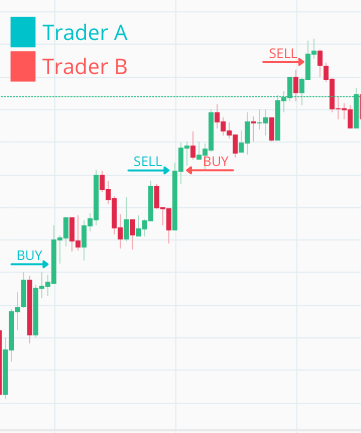
The Naive.Trader process(marked in the above diagram with blue color),
upon receiving the first trade event, immediately places a buy order at the current price.
Trader A exits and a new trader B is started which again immediately places a buy order at the same price as the previous trader just sold. When this gets filled, the sell order gets placed and the loop continues on and on.
We can see that there’s a problem here as we just paid a fee twice (once for selling by Trader A and once for buying by Trader B) without really gaining anything. Let’s say the fee is 0.1% per transaction. If Trader A sells at $100 and Trader B immediately buys at $100, we’ve lost 0.2% ($0.20) in fees for zero price movement. Trader A could have just held the currency and cashed in on double the profit in this specific situation - we’re essentially burning money on unnecessary round trips.
The solution is to be more clever about our buy order’s price.
The idea is simple, instead of placing a new buy order at the current price(price from the last TradeEvent), we will introduce a buy_down_interval:
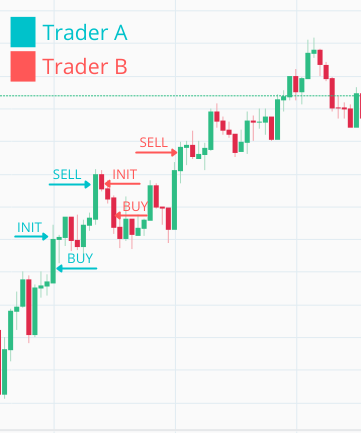
When a new Naive.Trader process receives its first trade event, it takes that price, reduces it by the buy_down_interval (for example, 0.005 means 0.5% below), and places a buy order at that calculated price.
When looking at the chart above we can figure out that buy_down_interval should never be smaller than double the fee that you are paying per transaction.
Why double? Because each complete cycle involves two fees: one when buying and one when selling.
At the moment of writing, Binance’s transaction fee is 0.1%, so our buy_down_interval should be at least 0.2% to break even -
anything above that is profit margin.
One thing to keep in mind: if the buy_down_interval is set too high,
our buy orders might never get filled because the price may not drop that far.
6.3 Naive.Trader implementation
Let’s open the Naive.Trader module’s file(/apps/naive/lib/naive/trader.ex) and add buy_down_interval to its state:
  # /apps/naive/lib/naive/trader.ex
  ...
  defmodule State do
    @enforce_keys [
      :symbol,
      :buy_down_interval, # <= add this line
      :profit_target,
      :tick_size
    ]
    defstruct [
      :symbol,
      :buy_order,
      :sell_order,
      :buy_down_interval, # <= add this line
      :profit_target,
      :tick_size
    ]
  end
  ...
Next, we need to update the initial handle_info/2 callback which places the buy order. We need to retrieve the buy_down_interval and the tick_size from the state of the trader to be able to calculate the buy price. We will put the logic to calculate that price in a separate function at the end of the file:
  # /apps/naive/lib/naive/trader.ex
  ...
  def handle_info(
        %TradeEvent{price: price},
        %State{
          symbol: symbol,
          buy_order: nil,
          buy_down_interval: buy_down_interval, # <= add this line
          tick_size: tick_size                  # <= add this line
        } = state
      ) do
    price = calculate_buy_price(price, buy_down_interval, tick_size)
    # ^ add above call
    ...
To calculate the buy price we will use a very similar method to the one used before to calculate the sell price - if you recall, both involve percentage-based adjustments followed by tick size alignment.
The formula is straightforward: buy_price = current_price - (current_price × buy_down_interval).
For example, if the current price is $100 and our buy_down_interval is 0.005 (0.5%), we’d place our buy order at $99.50.
First, we cast all variables into Decimal structs.
This is important for financial calculations - regular floats can introduce tiny rounding errors that accumulate over many trades.
With Decimals, we get exact arithmetic.
Then we subtract the buy-down amount (price × buy_down_interval) from the price.
The number that we will end up with won’t necessarily be a legal price as every price needs to be divisible by the tick_size
which we will ensure in the last calculation:
  # /apps/naive/lib/naive/trader.ex
  ...
  defp calculate_buy_price(current_price, buy_down_interval, tick_size) do
    current_price = D.from_float(current_price)

    # not necessarily legal price
    exact_buy_price =
      D.sub(
        current_price,
        D.mult(current_price, buy_down_interval)
      )

    # Round down to nearest legal tick size
    # e.g., 0.15173 with tick_size 0.0001 -> div_int gives 1517 -> mult gives 0.1517
    exact_buy_price
    |> D.div_int(tick_size)
    |> D.mult(tick_size)
    |> D.to_float()
  end
  ...
6.4 Naive.Leader implementation
Next, we need to update the Naive.Leader as it needs to add buy_down_interval to the Naive.Trader’s state:
  # /apps/naive/lib/naive/leader.ex
  defp fetch_symbol_settings(symbol) do
    ...

    %{
      symbol: symbol,
      chunks: 1,
      # 0.01% for quick testing
      buy_down_interval: "0.0001", # <= add this line
      # -0.12% for quick testing
      profit_target: "-0.0012",
      tick_size: tick_size
    }
  end
  ...
6.4.1 Manual testing in IEx
That finishes the buy_down_interval implementation, we will jump into the IEx session to see how it works, but before that, for a moment we will change the logging level to debug to see current prices:
After starting the streaming we should start seeing log messages with current prices. As we updated our implementation we should place our buy order below the current price as it’s visible below:
$ iex -S mix
...
iex(1)> Streamer.start_streaming("XRPUSDT")
{:ok, #PID<0.313.0>}
iex(2)> Naive.start_trading("XRPUSDT")
21:16:14.829 [info]  Starting new supervision tree to trade on XRPUSDT
...
21:16:16.755 [info]  Initializing new trader for XRPUSDT
...
21:16:20.000 [debug] Trade event received XRPUSDT@0.15180000
21:16:20.009 [info]  Placing BUY order for XRPUSDT @ 0.1517, quantity: 100
As we can see our Naive.Trader process placed a buy order at 0.1517, which is below the current price of 0.1518 from the trade event.
The difference represents our buy_down_interval applied to the current price and rounded to the tick size.
Nice! With this change, our traders are now smarter about when they enter positions:
- Buy orders are placed below the current market price, not at it
- We avoid the “treadmill effect” of paying fees for zero price movement
- The
buy_down_intervalgives us control over how much of a dip we require before buying back in
So, What’s Next?
Our traders now buy at better prices, but there’s still a hardcoded value lurking in the code: the quantity. We’ve been buying exactly 100 units every time, regardless of the symbol’s price or how much budget we actually have. That’s very naive of us. Actually, it’s a bit too naive.
In the next chapter, we’ll introduce a proper budget for each trader and calculate the quantity dynamically based on that budget and the current price.
This will make our trading more realistic and set us up for running multiple traders with divided budgets.
[Note] Please remember to revert the change to logger level as otherwise there’s too much noise in the logs.
[Note 2] Please remember to run mix format to keep things nice and tidy.
The source code for this chapter can be found in the book’s source code repository (branch: chapter_06).